

Informix WHERE CLAUSE DATE bug in SAP BusinessObjects
While creating a universe off an Informix database, I discovered a bug that SAP never took care of or provided any documentation on fixing, which was quite of surprising. Basically using a date object in the filter will generate an incorrect WHERE clause. In the following example, we create a simple universe off an Informix database via an ODBC connection Informix ODBC Connection Using...
November 29th, 2021 by David Lai
How to bypass opendocument login screen
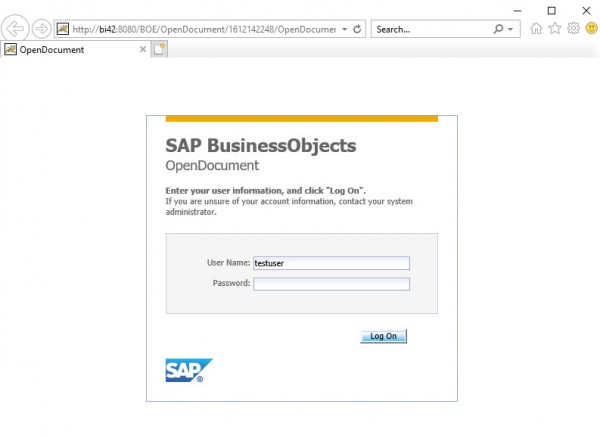
In this article I’d like to show you a simple example of how to bypass the opendocument login. This is especially useful if you are trying to use an opendocument call to open up a web intelligence document from a 3rd party application. It’s quite simple, and you can expand the example to use trusted authentication if desired. Download the custom.jsp here (more…)
April 9th, 2018 by David Lai
First look and thoughts on Fiori-fied BI Launchpad
After seeing the Fiori BI Launchpad previews, I was so excited to finally get SAP BI 4.2 SP4 installed on our sandbox. It was literally like opening presents during Christmas as I couldn’t wait to try out the fresh new interface that would be similar to SAP ONE Support Launchpad . After the installation was complete, it was time to log in to the new BI Launchpad. So I typed in the url http://server:8080/BOE/BI,...
September 13th, 2017 by David Lai

CurrentDate() not what you think in Web Intelligence
In Web Intelligence there are a variety of helpful date functions that you can use. 2 in particular are CurrentDate() and CurrentTime(). You would think that CurrentDate() returns just the current date and CurrentTime() returns the current datetime. However both return the exact same result which makes it confusing, especially if you are using date dimensions where the time is stripped off. The funny...
April 10th, 2017 by David Lai

Web Intelligence – Unable to insert comment
The ability to add commentary to web intelligence reports is a powerful new feature released in SAP BusinessObjects 4.2. However, it does not work straight out of the box. Here are some steps to get comments to work. (more…)
November 30th, 2016 by David Lai
Mixing unmerged dimensions in Web Intelligence
The concept of merging queries in Web Intelligence is quite simple, however once you have a requirement of mixing unmerged dimensions in an output table, this is when it gets messy! Let’s take a look at the 2 sample queries below: Query #1 (Sale Revenue by Year): Year, Quarter, Sales Revenue Query #2 (Quantity Sold by State and Year): Year, State, Quantity Sold Each query contains two dimensions...
March 3rd, 2016 by Daniel Li

BEx Query greyed out in Web Intelligence
A common problem when trying to access a BEx Query from Web Intelligence is that we cannot! I want to build a query off the sales test query, however it is greyed out. Well here’s an easy fix. All you need to do is open the query up in BEx Query Designer, go to the Query menu and select Properties Click on the Extended tab and then make sure By OLE DB for OLAP is checked under Allow External...
March 19th, 2015 by David Lai
Cascading Prompts in BOBJ Dashboards and WEBI
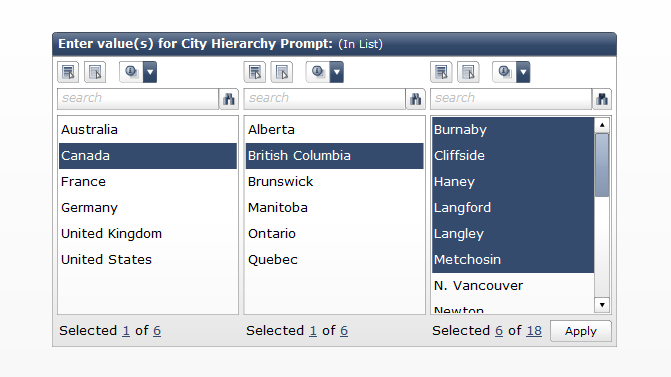
A cascading prompt, helps the user focus on values they want to include in the prompt without the need to go through every possible value. A great example comes from a list of cities around the world. Imagine if we had to go through a huge dropdown list every time in order to find our desired city. It would be much easier if we can first select a country, then province/state and then the city. This...
March 12th, 2015 by David Lai

Scheduling jobs based on trigger events
Being able to schedule a job based on a trigger event is a very important feature in SAP BusinessObjects. For example, let’s say we have a report that is refreshed daily based on data updated by a daily ETL process. We only want the report to be refreshed if the ETL process completes successfully. There are 2 ways of creating a trigger event. You can either create a file trigger, where the ETL...
March 9th, 2015 by David Lai
About David Lai

SAP BusinessObjects Dashboards 4 Cookbook


