
SAP BusinessObjects Dashboard 4.1 Cookbook now available!
Time flies as the original cookbook which covered SAP BusinessObjects Dashboards 4.0 has been in publication for almost five years. Xavier Hacking and I would like to give a Big Thank You to those who have purchased and benefited from our original cookbook. We hope that it has proven to be a useful resource! Fast forward five years later and we are now proud to be releasing an updated version which...
April 6th, 2015 by David Lai

Using Xcelsius and Webservices to insert comments into a database
A common request that I have seen with my clients, is the ability to enter comments into a dashboard and then view those comments when they re-open the dashboard in the future. Unfortunately Xcelsius does not have a native mechanism to send data back to the database, as a dashboard’s main purpose to read data and not write back to the database. However, I do see the value in being able to persist...
January 26th, 2012 by David Lai

BI Web Services presentation from SAP Inside Track 2011 now available for download!
Thanks to everyone who attended my presentation on BI Web Services at SAP Inside Track Vancouver 2011! A replay of the presentation can be found at the following link => http://bit.ly/rkBU1p I’ve also attached the powerpoint presentation that you can download here
October 3rd, 2011 by David Lai
All you need to know about Open Document (opendoc) Part 2
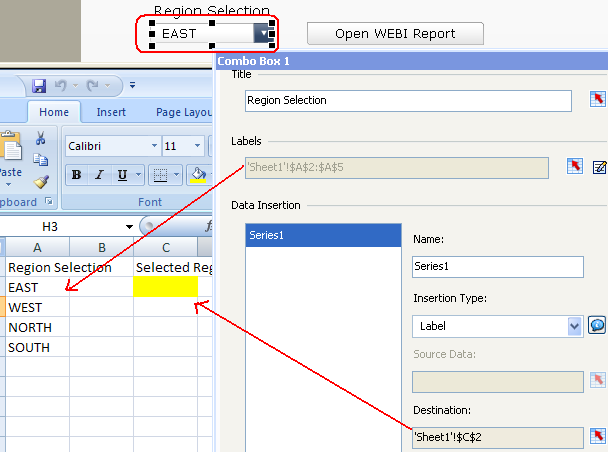
I’ve been getting a lot of emails lately on how to setup opendocument (opendoc), so I’d like to post this tutorial on how to do so which works for Business Objects XI 3.1. Unfortunately my previous tutorial at http://davidlai101.com/blog/2008/11/04/all-you-need-to-know-about-opendoc/ only works with Business Objects XI R2 Please note that the tutorial was taken from SAP BusinessObjects...
September 29th, 2011 by David Lai
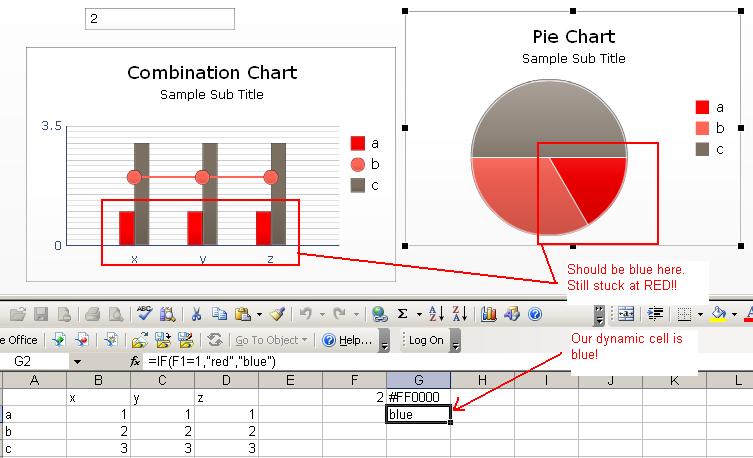
Bug in Xcelsius 2008 SP4 that does not allow dynamic color changing
I’ve had several comments on my “Xcelsius Dynamic Color Binding” post regarding issues where their dynamic colors were not changing. Well I did a quick test and yes there is a bug! So I wanted to warn everyone including SAP about this new bug. (more…)
August 12th, 2011 by David Lai

Using Filtered Rows instead of VLOOKUP
This article talks about using the filtered rows technique instead of a VLOOKUP. Not until Xcelsius 2008 came out, were we able to filter on multiple rows of data that matched 1 entry. So in order to accomplish this we would either have to use VLOOKUP or INDEX MATCH. Using this technique was very cumbersome and although filtered rows has been available for a while, I have been on a couple engagements...
July 2nd, 2010 by David Lai
Xcelsius Push Button
The Push Button is a powerful new feature in Xcelsius SP3 that allows developers to transfer source data from an arbitrary sized cell block to a destination cell block of the same size. This gives us a triggering type mechanism where we needed to jump through hoops in order to accomplish before. I’ve attached a video and the example xlf source file which shows how to use the push button as a...
May 29th, 2010 by David Lai
Xcelsius Canvas Container
In this article I’ve attached a video that talks about the new Canvas Container feature in Xcelsius 2008 SP3. I found that the Canvas container is very easy to use and provides the same functionality as the group method but allows the flexibility of moving objects in and out of the canvas very easily. I totally recommend that Xcelsius developers use the Canvas container method to group objects...
March 26th, 2010 by David Lai
About David Lai

SAP BusinessObjects Dashboards 4 Cookbook


