
Fusion Charts Wrapper Online Guide
February 3, 2010 by: David LaiHere’s the online guide to the Fusion Charts Wrapper found at http://davidlai101.com/blog/2010/02/02/fusion-charts-java-wrapper-updated/
If you just need the JavaDocs, please go to http://davidlai101.com/fusioncharts-javadoc/
Steps to build a Fusion Chart in Java
Please ensure that you have example.jsp and example_alternative.jsp open in order to follow the steps below to build a fusion graph.
If you haven’t downloaded the full project file please download it here
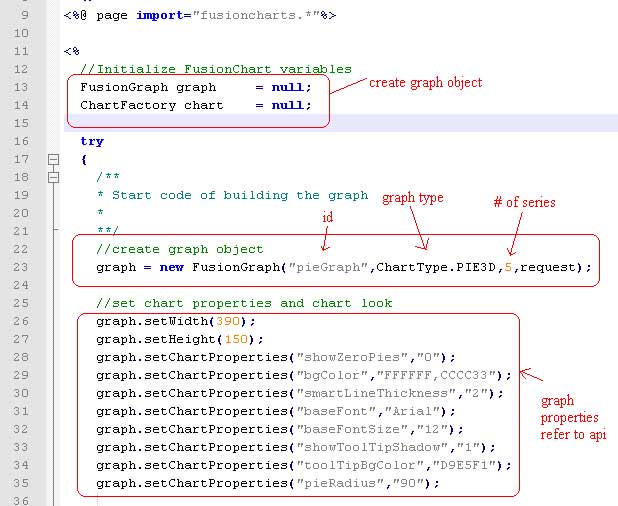
Create FusionGraph
First you will want to create a FusionGraph object and set its properties
To create a FusionGraph object you will need to define a Graph Id, Chart Type which is an enum from ChartType and the size of items in each of it’s series. Let’s start with a simple pie graph example that has 5 slices.
FusionGraph pieGraph = new FusionGraph(“pieGraph”,ChartType.PIE3D,5,request);
Note that the request parameter is required so that we can send the FusionGraph object within jsps.
Next you may want to set the properties of the graph by giving it a customized look. Please refer to the Chart XML API found in http://www.fusioncharts.com/docs for the properties you can customize.
For example if I wanted to set the background of the graph to a gradient of white and yellow I would do this:
graph.setChartProperties(“bgColor”,”FFFFFF,CCCC33”);
You will also want to set the width and height of the graph by using the setWidth(int) and setHeight(int) methods, or just go with the default which is width=600, height=300.
Now to create a series inside the graph:
Series series = graph.createSeries(“pieSeries”);

Series
You will have one or more series containing data.
The series object has a set of member properties that you can set. Please refer to the API for more information.
For the pie graph you will probably want to set the values, and the colors for each pie.
To do this you can use the setColor(int index, String color) and setValue(int index, double value) methods.

ChartFactory
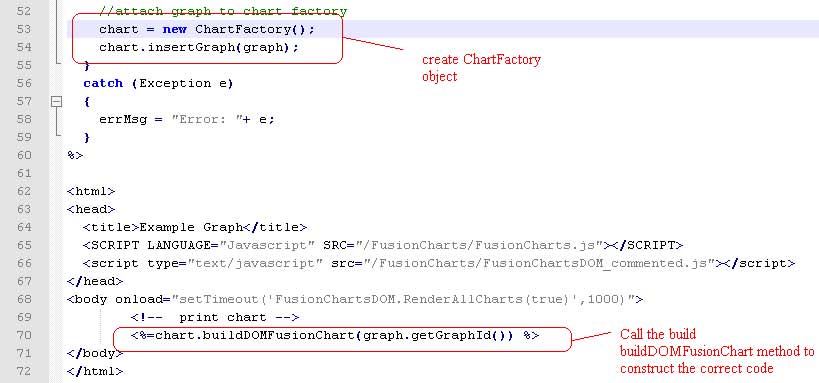
When you are finished creating the graph, you will want to put the graph in a ChartFactory so that the Chart Factory can build the desired xml string for the data. To generate the data for the pie graph, code the following:
ChartFactory chartFactory = new ChartFactory();
chartFactory.insertGraph(pieGraph);
chartFactory.buildFusionChart(“pieGraph”); //or use pieGraph.getGraphId() for the String parameter
A new method called “buildDOMFusionChart(String graphName) was created so that we could utilize the FusionChartsDOM_commented.js which allows us to use an html tag to display the fusion chart.
All you need to do is add the following line instead of “chartFactory.buildFusionChart(“pieGraph”)
You would use on the jsp
chartFactory.buildDOMFusionChart(“pieGraph”);
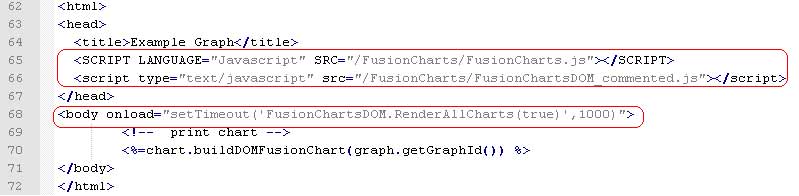
You will need to include in your body tag
<body onload=”setTimeout(‘FusionChartsDOM.RenderAllCharts(true)’,1000)”>
In addition make sure you have the scripts loaded into your jsp if you are using jsp
<SCRIPT LANGUAGE=”Javascript” SRC=”/FusionCharts/FusionCharts.js”></SCRIPT>
<script type=”text/javascript” src=”/FusionCharts/FusionChartsDOM_commented.js”></script>
Using the helper chartBuilder.jsp
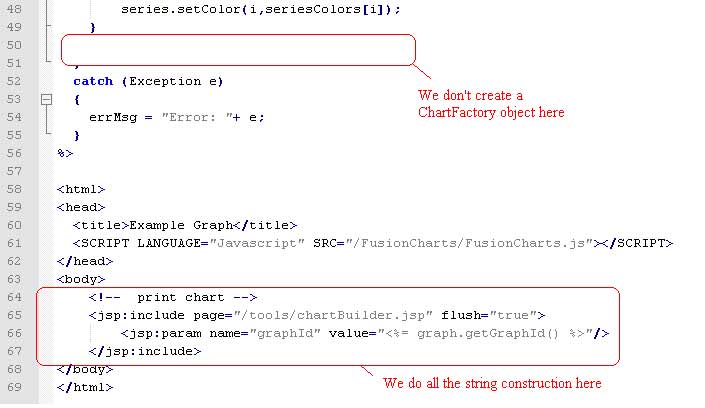
The chartBuilder.jsp has built in Javascript that works with FusionCharts.js and renders the chart for you provided that you provide the correct graph parameter. You can either use this method or the buildDOMFusionChart method which is newer.
All you need to do is provide the graphId of the graph you want to display
For example if I wanted to display the pie graph from the earlier examples, I would do this
<jsp:include page=”/tools/chartBuilder.jsp” flush=”true”>
<jsp:param name=”graphId” value=”pieGraph”/>
//or use <%=pieGraph.getGraphId() %> instead of the string
</jsp:include>
Note: You must use example_alternative.jsp to see this
Example.jsp and example_alternative.jsp
Please take a look at the example.jsp attached that will help you build a pie graph using the DOM method. Example_alternative.jsp provides an example of building a chart using the chartBuilder.jsp method. The drawback of using the chartBuilder.jsp method is that you make another server call when calling that jsp. So with pages that have many charts, it will be better using the DOM method.


Hi David,
Thanks for this. Much appreciated.
Can you tell me how we can display the graphs using your code in JSF page ?
Very Interesting, I see that you use JSP… is it possible to use this API with GWT? specifically with VAADIN?
Anyways keep up the good work 🙂