
Cascading List of Values
January 8, 2009 by: David LaiList of Values is a powerful feature that allows users to select from a pick list when setting conditions in a query. This is especially important if you want to query on codes linked to a set of products. Using the List of Values feature, you will not need to memorize which codes go to which products.
The part that I would like to focus on is Cascading List of Values. In a real world Data warehouse for example, we may have thousands of customer codes. As a business user, in order to get to the customer codes I desire, I would probably want to select my customers from a certain region. Using Cascading List of Values, I can first select which regions I want to view and then select my customers from there.
Please note that it is important to think of the most efficient path a business user can take to get to their answer. One blunder that happens with many developers is the lack of planning when creating a Cascading List of Values. Some may include too many levels which in the long run increases the response time of user selection or too few levels which would cause users to spend too much time looking for certain values.

Here is an example on creating a cascading list of values. Let’s use a universe that contains markets inside regions and create a cascading list on markets. At the end of the day we will want to select our markets that belong to a set of regions that we drilldown from. Note that I have used markets instead of customers because it’s easier to display on the webi pic.
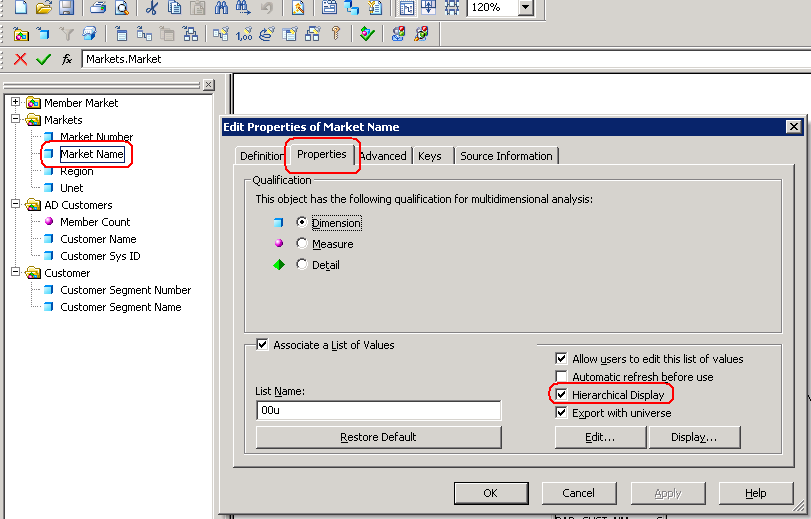
First we will need to go into the “edit properties” tab of the market object object. From there click on the edit button.
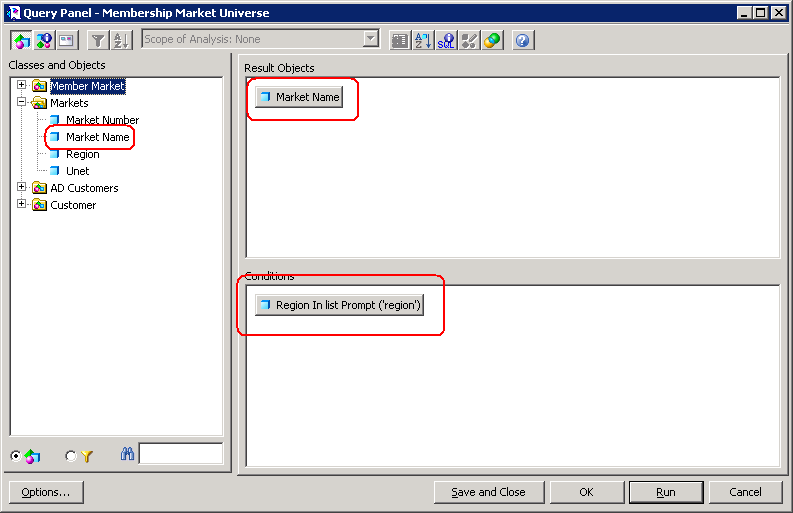
A query panel will come up with the market object on the Result Objects window. On the conditions window, drag and drop the “Region” object and choose the “in list” option so that we can choose from a list of Regions.
After running the query, it is important to have the Hierarchical View checked in the edit properties tab. The reason is that this view is much more user intuitive than the tabular view when selecting from the prompts. You can test this out to see for yourself.
Once you have become comfortable with creating cascading list of values, you will be able to present business users with user intuitive selections that will increase productivity and reduce response time.


hi david,
very informative cascading LOV arcticle u’ve got here. i was just wondering if u have come across something like this but slightly different. considering your example above, the user wants it to be in such a way that is as following:
1. level 1: region
first, the user picks a region from a list of regions. e.g. Australia.
2. level 2: market name
then, in this level, he/she only wants to see the market names available in Australia.
it doesn’t matter if the hierarchies are not being displayed. main concern is the capability of the data to streamlined to only the user’s selection. (which can be done in crystal reports)
pls advise. cheers!
1000000 thanks to David Lai
Hi David,
One question, Can we rename (or Alias) the Values in LOV ?? Like i have Australia, Germany, Italy etc in my Country object, and in Report filter i want to show these country as AUS, GER, ITA etc.
How can we cutomize the LOV ??
Thanks,
Saurabh
Hi Saurabh,
The easiest way is to have another column called short_name in the table with the values AUS, GER, ITA, etc. You can then refer to those columns when creating your LOV so it shows the short_name in your prompt selection.
Hi David,
I have a requirement with two prompts ID & Name ,when the user picks
Prompt 1 : ID
and selects ID from a list of ID,For Eg : ID= 678
then in the second prompt name
Prompt 2: Name
the user wants to see the all Names for ID 678.
And the user does not want the Hierarchy or Tree View of list of values
I have created list of values for ID,Name and in Name properties I have where condition for ID
In univese when i click display on name object it prompts me for ID and then it shows the names for that id,Which works fine in universe,
But in webi report ,the order of prompts are reversed it shows Name and then Id
the functionality works fine but the order is reversed ,I need Id first and then Name
Please Advice me, Thank You !