
Best Practices for Organizing and Naming Objects
December 4, 2008 by: David LaiWhile working with many Universes, I’ve noticed that sometimes not enough attention is given to naming objects and the ordering of objects. This in turn may cause confusion with the business users since they are not completely clear on what each of the objects do.
Ordering of objects
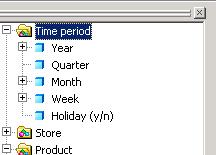
When you have objects of the same class grouped together, it makes it much clearer to the business user to view when they see it in a hierarchal form instead of alphabetically. Lets take for example date objects. We have a year, quarter, month, and day object. The largest increment or grouping should always appear at the top and the most detailed at the bottom. Having this ordering will facilitate drilldowns. If these were sorted alphabetically, a business user would have to do more work in order to come up with a drilldown hierarchy.
Naming of objects
Universe Designers should always follow the 4 Cs (Customer Oriented, Clear, Consistent, Concise)
Customer Oriented
Objects created from the universe should be business oriented; anything that the business user does not need to see should never be created.
Clear
Objects should always have a clear name. For example if there are multiple types of month names (ie: Jan, 01, January), to be clear a designer should create detail objects for all 3 depending on what the business user wants to see and name them accordingly. If we just had the name “Month”, a business user would not know if it was either Jan, 01, or January.
Consistent
Object names should always have consistent formatting, this is usually a general rule so that users are familiar with the object names
Concise
Sometimes names can have a shortform ie: Article Code could be named SKU. If the article code is only 4 characters long, it would be a waste of column space on the report to have Article Code on the column heading, thus SKU would serve a better purpose unless you would want the business user to manually change report name each time.
I hope that this article will help designers put these 2 items in their good practices checklist so that it will eliminate business user’s headaches in the long run.


